> ## Documentation Index
> Fetch the complete documentation index at: https://oom-wg.dev/llms.txt
> Use this file to discover all available pages before exploring further.
# 原生模块特性
> ShiroSU NT 的原生模块特性
对于大部分内容,ShiroSU 与 [**Magisk**](https://topjohnwu.github.io/Magisk/guides.html) 和
[**KernelSU**](https://kernelsu.org/zh_CN/guide/module.html) 基本保持一致,此处仅介绍不同之处
## module.prop
### ANSI 转义码
ShiroSU 允许在 `module.prop` 或 Shell 脚本中使用{' '}
**ANSI 转义码**
{' '}
来丰富文本的显示
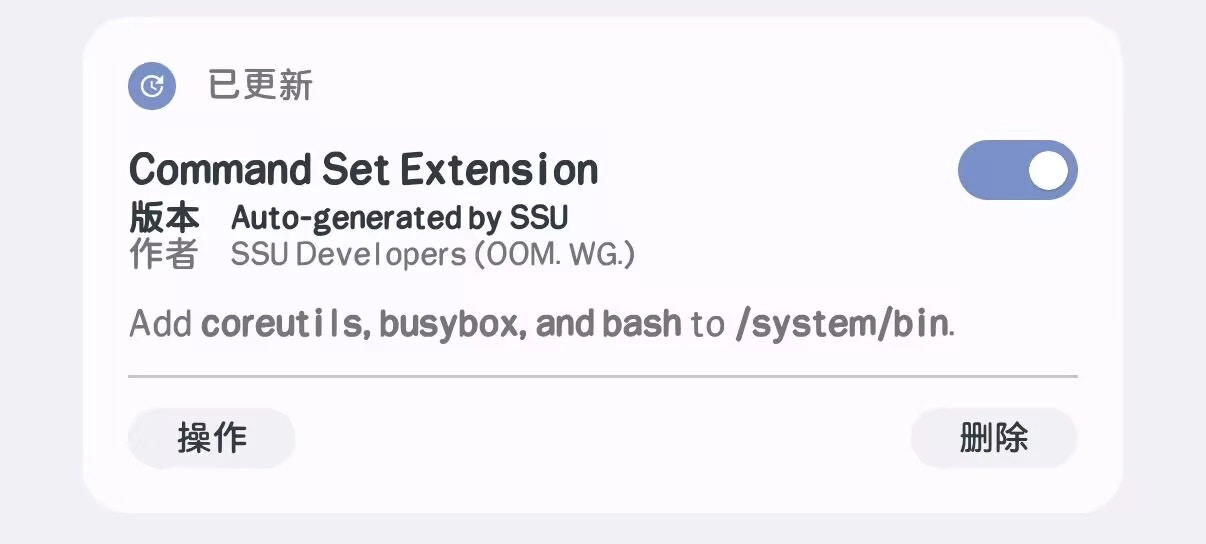
以 ShiroSU Compat 自带的拓展模块为例,可在 `module.prop` 使用如下代码:
```properties {4,8} module.prop theme={null}
id=ssu_cmd_ext
name=Command Set Extension
version=Auto-generated by SSU
versionAnsi=\e[1mAuto-generated\e[0m by SSU
versionCode=1
author=SSU Developers (OOM WG)
description=Add coreutils, busybox, and bash to /system/bin.
descriptionAnsi=Add \e[1mcoreutils, busybox, and bash\e[0m to \e[1m/system/bin\e[0m.
```
使用如上 `module.prop` 后,
模块在 ShiroSU 管理器中显示时 `Auto-generated`、`coreutils, busybox, and bash`
以及 `/system/bin` 均会被加粗
在 `module.prop` 中,
可使用 `nameAnsi`、`versionAnsi`、`authorAnsi`、`descriptionAnsi`、`actionDescriptionAnsi`
来显示包含 ANSI 转义码的文本
虽然不包含 `Ansi` 后缀同样可以使用,但是为了确保兼容性,请这么做
 ### 其他属性
以 ShiroSU 的示例模块为例,可在 `module.prop` 使用如下代码:
```properties module.prop theme={null}
id=ssu-mod-eg
name=SSU Module E.G.
# nameAnsi=...
version=Version 1
# versionAnsi=...
versionCode=1
author=SSU Developers (O.O.M. W.G.)
# authorAnsi=...
description=ShiroSU module e.g.
# descriptionAnsi=...
actionDescription=Action
# actionDescriptionAnsi=...
# updateJson=https://...
```
除了 `nameAnsi`、`versionAnsi`、`authorAnsi`、`descriptionAnsi`、`actionDescriptionAnsi`
为 **ANSI 转义码** 相关内容之外,ShiroSU 还会解析如下内容:
* `actionDescription`(包括 `actionDescriptionAnsi`): 定义此内容,会在执行操作前显示弹窗,此内容用于描述操作有何作用
* `moduleIcon`/`actionIcon`/`webuiIcon`: 各个类型图标的相对路径,不允许绝对路径或路径穿越
### 覆写机制
ShiroSU 使用 `module.override.prop` 来覆写 `module.prop` 中的字段,可覆写的有:
`name`、`version`、`author`、`description`、`actionDescription` 以及包含 `Ansi` 后缀的字段
## 模块系统
### Systemless
ShiroSU NT 采用元模块机制实现挂载,本身提供了一个原生元模块 —— ShiroSU Systemless
ShiroSU 的原生元模块
ShiroSU NT 挂载内容的挂载源为 `SSU`,任何模块挂载内容的挂载源都应该为 `SSUS`
### Shell
ShiroSU NT 在此处与其他 root 实现有较大差异,运行的所有 Shell 脚本**并不**在 `BusyBox` 中以 “*独立模式*” 运行
为了提升 Shell 脚本开发的便利性,ShiroSU NT 使用{' '}
用 Rust 编写的
### 其他属性
以 ShiroSU 的示例模块为例,可在 `module.prop` 使用如下代码:
```properties module.prop theme={null}
id=ssu-mod-eg
name=SSU Module E.G.
# nameAnsi=...
version=Version 1
# versionAnsi=...
versionCode=1
author=SSU Developers (O.O.M. W.G.)
# authorAnsi=...
description=ShiroSU module e.g.
# descriptionAnsi=...
actionDescription=Action
# actionDescriptionAnsi=...
# updateJson=https://...
```
除了 `nameAnsi`、`versionAnsi`、`authorAnsi`、`descriptionAnsi`、`actionDescriptionAnsi`
为 **ANSI 转义码** 相关内容之外,ShiroSU 还会解析如下内容:
* `actionDescription`(包括 `actionDescriptionAnsi`): 定义此内容,会在执行操作前显示弹窗,此内容用于描述操作有何作用
* `moduleIcon`/`actionIcon`/`webuiIcon`: 各个类型图标的相对路径,不允许绝对路径或路径穿越
### 覆写机制
ShiroSU 使用 `module.override.prop` 来覆写 `module.prop` 中的字段,可覆写的有:
`name`、`version`、`author`、`description`、`actionDescription` 以及包含 `Ansi` 后缀的字段
## 模块系统
### Systemless
ShiroSU NT 采用元模块机制实现挂载,本身提供了一个原生元模块 —— ShiroSU Systemless
ShiroSU 的原生元模块
ShiroSU NT 挂载内容的挂载源为 `SSU`,任何模块挂载内容的挂载源都应该为 `SSUS`
### Shell
ShiroSU NT 在此处与其他 root 实现有较大差异,运行的所有 Shell 脚本**并不**在 `BusyBox` 中以 “*独立模式*” 运行
为了提升 Shell 脚本开发的便利性,ShiroSU NT 使用{' '}
用 Rust 编写的 Bash 兼容解释器
}
cta="GitHub"
href="https://github.com/reubeno/brush"
>
brush
{' '}
运行 Shell 脚本,并且 Shell 解释器中内置了{' '}
用 Rust 编写的 coreutils
}
cta="GitHub"
href="https://github.com/uutils/coreutils"
>
uutils
{' '}
的部分命令,以 Magisk 的 BusyBox 作为替补
也就是说,命令**优先从 uutils 获取**(部分有兼容性问题的指令没有内置),没有的命令才会从 BusyBox 获取
由于 uutils 命令覆盖面不完整,命令会通过 `PATH` 环境变量优先回退至 BusyBox,请勿在模块的 Shell 脚本内硬编码修改 `PATH`!
除此之外,在 ShiroSU NT 的模块环境中,还内置了 [jaq](https://github.com/01mf02/jaq)(会设置别名为 `jq`),
以及 [ripgrep](https://github.com/BurntSushi/ripgrep)
#### 执行环境
ShiroSU NT 的模块系统是直接集成了 brush 而不是编译为独立二进制,Shell 脚本执行都是在模块系统内部进行 `fork` 执行的
因此模块系统在执行所有 Shell 脚本时,**都会注入环境变量与工具函数**,
所有通用脚本或模块都可以在任何由 ShiroSU NT 执行的 Shell 脚本中使用提供的环境
并且 ShiroSU NT 的所有工具函数均是用 Rust 编写的 brush 内置指令,在部分场景下可能与 Shell 的行为不一致,但大部分场景下都是一致可用的
##### 执行约束
模块执行除了元模块机制的约束下,都是无序执行的
通用脚本执行则按文件名顺序执行,执行顺序总是固定的
执行模块时,会判断模块 ID 不以 `.` 开头且模块 ID 与模块目录名一致,执行通用脚本时,也会判断文件名不以 `.` 开头
当判断失败时,均会跳过执行,错误的模块/通用脚本不会参与到模块系统生命周期的任何一部分,它们会在被发现时删除
##### 环境变量
为了便于区分,ShiroSU NT 在 Shell 脚本运行时注入以下变量:
* `SSU` (`bool`): 在 ShiroSU NT 环境下运行时,此值将为 `true`
但这并不能代表可以通过 `$SSU && # code ...` 来执行代码,应当始终使用 `[ "$SSU" = true ]` 或类似方法来检测 ShiroSU
* `SSU_VER` (`string`): ShiroSU NT 的版本号
* `SSU_VER_CODE` (`uint64`): ShiroSU NT 的纯数字版本号
* `SSU_LATE_LOAD`/`LATE_LOAD_MODE` (`bool`): 在越狱模式下运行时,此值将为 `true`
* `SSU_MODULE`/`MODULE_ID` (`string`): 当前模块 ID
(在元模块 `metauninstall.sh` 执行时 `MODULE_ID` 将为要卸载模块的 ID)
#### Recovery
ShiroSU NT 不支持通过 Recovery 安装模块,
并且在模块安装时 `META-INF/com/google/android/update-binary` 中的代码不会被执行
#### SU 调用
ShiroSU NT 的 SU 实现除了 `su` 外还附带了 `sudo`,支持部分简单传参或基于 `su` 的传参
但是任何模块内都**不应该**通过 `sudo` 或 `su -c` 执行 Shell 命令!
同样的,任何模块也**不应该**通过**硬编码**来获取命令,例如 `/data/adb/ssu/bin/busybox crond`, 因为无论是在 BusyBox 的
“*独立模式*” 还是直接通过 `PATH` 注入命令,命令都已经可以直接调用,无需任何硬编码的手动获取行为